Lesson Five - Tech: Difference between revisions
(created lesson five tech) |
(Added a bunch of tech to the lesson five page) |
||
| Line 8: | Line 8: | ||
EQUIPMENT: | EQUIPMENT: | ||
Cables:<gallery> | === Cables: === | ||
<gallery> | |||
File:01 male connector.jpg|SOUND CABLES - Male tends to be input / Female tends to be output | File:01 male connector.jpg|SOUND CABLES - Male tends to be input / Female tends to be output | ||
File:02 female connector.jpg|SOUND CABLES - Male tends to be input / Female tends to be output | File:02 female connector.jpg|SOUND CABLES - Male tends to be input / Female tends to be output | ||
File:03 XLR cable.png|XLR - Most often used to connect from mics into the mixer (whether using the snake or not). Also from the mixer to the amp | File:03 XLR cable.png|XLR - Most often used to connect from mics into the mixer (whether using the snake or not). Also from the mixer to the amp | ||
File:04 Quarter inch.png|Quarter inch - Most often used to carry signal into the mixer from a keyboard or submixer or into a direct box. Also usually into the speakers. | File:04 Quarter inch.png|Quarter inch - Most often used to carry signal into the mixer from a keyboard or submixer or into a direct box. Also usually into the speakers. | ||
File:05 quarter inch mono.png|Quarter inch mono - one line | |||
File:06 quarter inch stereo.png|Quarter inch stereo - two lines | |||
File:07 eighth inch.png|Eighth inch, also called phono mini or headphone jack. Eighth inch mono - one line; eighth inch stereo - two lines | |||
File:08 RCA pinplug.png|RCA pinplug (or just RCA) - Often the inputs into a mixer. Go from the Show Cue Systems computer to the submixer. CD player (if any) into mixer | |||
File:09 banana plug.png|Banana plug - Carry power from amplifiers. Many amps will use banana plugs and quarter inch mono | |||
</gallery> | |||
=== Snake: === | |||
<gallery> | |||
File:10 snake.jpg|Snakes - Combine XLR inputs and outputs into one cable for organization and ease of use. | |||
File:11 snake to board.jpg|Snakes - Combine XLR inputs and outputs into one cable for organization and ease of use. | |||
</gallery> | |||
=== Power cables === | |||
<gallery> | |||
File:12 power cord.png|Extension cords. Female tends to be input, male tends to be output. Come in grounded and ungrounded varieties. Do not use an ungrounded (2-prong) extension cord. Also called "Edison" | |||
File:13 surge protector.png|Active surge protector. Actively condition the power and may have battery backup | |||
File:14 power strip.png|Passive surge protectors. Your run of the mill power strip. When plugging a power strip into another power strip (which should be avoided in any case), use the top outlet to leave room at the bottom for a larger transformer. | |||
File:15 zip cord.png|IEC3 aka IBM or Zip Cable. The power cords that go directly into devices such as a mixer or amplifier. | |||
</gallery> | |||
=== Light cables === | |||
[[File:16 DMX cable.png|none|thumb|Male tends to be input, female tends to be output. XLR - not all XLR cables are 3 pin DMX. You can't tell the difference until you plug it in and the lights don't work. DMX - all DMX are XLR cables.]] | |||
=== Computer connectors === | |||
[[File:17 USB cable.png|none|thumb|USB]] | |||
=== How to wrap cables: === | |||
([https://www.youtube.com/watch?v=kda4DPAn3C4 video]) - over under | |||
Wrapping the cables correctly helps them to all lay flat and come up easily. | |||
=== Microphones (mics) === | |||
<gallery> | |||
File:18 Shure beta 87a.png|Shure Beta 87a - 87s feed back less and are more precise for vocals. These take Phantom Power. Phantom Power mics use an electromagnet rather than a standard magnet and therefore must recieve a continuous 48V supply of power. This supply comes from the board. Phantom Power should not be sent to any device that doesn't require it if at all possible. | |||
File:19 Shure sm58.png|Shure SM58 - The world's standard microphone. Everyone knows how to engineer and use them and they are VERY durable. | |||
File:20 Shure sm27.png|Shure SM27 - A large diaphragm studio condenser mic. We use them for choirs and crowd scenes. Anything with lots of voices on one mic. You can choose what pattern they are (see next image). | |||
File:21 mic pickup pattern.png|Microphone pickup patterns | |||
File:22 Shure beta 52a.png|Shure Beta52a - Kick mic. Huge diaphragm mic. Usually used for floor sounds in Foley. Very good for low registers. | |||
File:23 AT 8035.png|Audio Technica - AT 8035. Shotgun mics. Usually used in Foley. Extremely directional (Super Cardioid). Imagine a cone coming out of the bottom of the mic. Any sound you want picked up must happen in that cone. | |||
File:24 AKG C214.png|AKG C214 - What we use in the studio. The large diaphragm and the very high quality captures all the nuances of the voices. You can also set the pattern for a crowd or an individual. | |||
</gallery> | |||
=== Wireless mics === | |||
* We occasionally borrow wireless mics. They do not require phantom power, although they do require batteries and receivers which plug into the board. | |||
* We occasionally have folks that bring in their own supplies which may not be covered here. | |||
=== Speakers === | |||
<gallery> | |||
File:25 Sonic SM12 speakers.png|Sonic SM-12 - 2-way 12 inch speakers. ARTC owned and most often used if the house doesn't provide them. Passive speakers. | |||
File:26 JBL Eon speakers.png|JBL EON - Active 2-way speaker. Take unamplified signal by XLR or quarter inch. | |||
</gallery> | |||
=== Amplifiers === | |||
<gallery> | |||
File:27 Electro voice 7100 amp.png|Amps can also be built into the sound board on some occasions. Electro-Voice 7100. Takes XLR in and sends banana plug signal out. | |||
File:28 Mackie M1400I.png|Mackie M-1400I. Has both XLR and quarter inch inputs and banana plug and quarter inch outputs. It's a big honkin' beast made for big honkin' rooms. | |||
</gallery> | |||
=== Mixers === | |||
==== Front of House mixers - the bosses ==== | |||
<gallery> | |||
File:29 Soundcraft SI Impact.png|Soundcraft SI Impact. Fully digital mixer. Needs an amp, but does not need the rack mount extras. Outputs to a computer via USB | |||
File:30 Mackie Onyx 1640.png|Mackie Onyx 1640. Requires the rack mount extras. All analog in, but has both analog and digital out. Needs an amp. Output to a computer via Firewire. | |||
File:31 Yamaha EMX 5000.jpg|Yamaha EMX 5000. All analog mixer. Has a built-in amp, so unless you're doing a huge room you don't need one. Does not need the rack mount extras. | |||
</gallery> | |||
==== Submixers ==== | |||
<gallery> | |||
File:32 Mackie Pro FX8.jpg|Mackie Pro FX8 - Normally used as a Foley submixer, but isn't often used at all anymore (2026). All analog XLR or quarter inch in or out. Normally runs to the main mixer so there is no amp. Does require its own power via Zip cord. Can provide phantom power to all mic channels. | |||
File:33 Mackie DFX6.jpg|Mackie DFX 6. All analog XLR or quarter inch in or out. Connects to the main mixer so there is no amp. Does require its own power via Zip cord. Can provide optional phantom power to all mic channels. Typically used with the Show Cue Systems laptop using an external sound card which allows the SCS project to send multiple channels for easier mixing. | |||
</gallery> | </gallery> | ||
Revision as of 18:42, 1 May 2026
Technical Assistant
Everyone will be a technical assistant at ARTC. Because we usually have to set up and take down temporary performance stages in between other acts or on a tight schedule, we need all hands on deck. Below is a description of our equipment along with how we use it and important tips.
Your job as a technical assistant is to know what these things are and to do whatever the people who are in charge of set up tell you to do with them.
IMPORTANT NOTE: FOR ALL ITEMS, DO NOT TURN ON THE POWER UNTIL EVERYTHING IS CONNECTED AND ZEROED OUT
EQUIPMENT:
Cables:
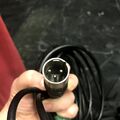
SOUND CABLES - Male tends to be input / Female tends to be output
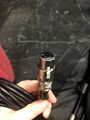
SOUND CABLES - Male tends to be input / Female tends to be output
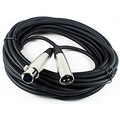
XLR - Most often used to connect from mics into the mixer (whether using the snake or not). Also from the mixer to the amp
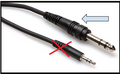
Quarter inch - Most often used to carry signal into the mixer from a keyboard or submixer or into a direct box. Also usually into the speakers.
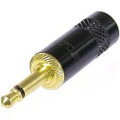
Quarter inch mono - one line
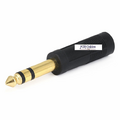
Quarter inch stereo - two lines
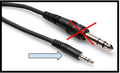
Eighth inch, also called phono mini or headphone jack. Eighth inch mono - one line; eighth inch stereo - two lines
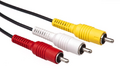
RCA pinplug (or just RCA) - Often the inputs into a mixer. Go from the Show Cue Systems computer to the submixer. CD player (if any) into mixer
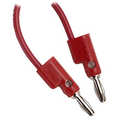
Banana plug - Carry power from amplifiers. Many amps will use banana plugs and quarter inch mono


Snake:
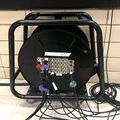
Snakes - Combine XLR inputs and outputs into one cable for organization and ease of use.
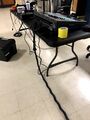
Snakes - Combine XLR inputs and outputs into one cable for organization and ease of use.


Power cables

Extension cords. Female tends to be input, male tends to be output. Come in grounded and ungrounded varieties. Do not use an ungrounded (2-prong) extension cord. Also called "Edison"
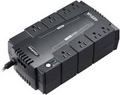
Active surge protector. Actively condition the power and may have battery backup
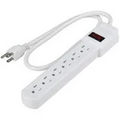
Passive surge protectors. Your run of the mill power strip. When plugging a power strip into another power strip (which should be avoided in any case), use the top outlet to leave room at the bottom for a larger transformer.

IEC3 aka IBM or Zip Cable. The power cords that go directly into devices such as a mixer or amplifier.


Light cables

Computer connectors

How to wrap cables:
(video) - over under
Wrapping the cables correctly helps them to all lay flat and come up easily.
Microphones (mics)
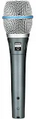
Shure Beta 87a - 87s feed back less and are more precise for vocals. These take Phantom Power. Phantom Power mics use an electromagnet rather than a standard magnet and therefore must recieve a continuous 48V supply of power. This supply comes from the board. Phantom Power should not be sent to any device that doesn't require it if at all possible.
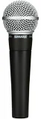
Shure SM58 - The world's standard microphone. Everyone knows how to engineer and use them and they are VERY durable.
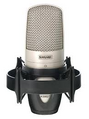
Shure SM27 - A large diaphragm studio condenser mic. We use them for choirs and crowd scenes. Anything with lots of voices on one mic. You can choose what pattern they are (see next image).
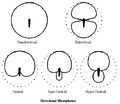
Microphone pickup patterns
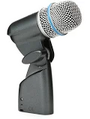
Shure Beta52a - Kick mic. Huge diaphragm mic. Usually used for floor sounds in Foley. Very good for low registers.
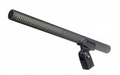
Audio Technica - AT 8035. Shotgun mics. Usually used in Foley. Extremely directional (Super Cardioid). Imagine a cone coming out of the bottom of the mic. Any sound you want picked up must happen in that cone.
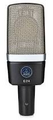
AKG C214 - What we use in the studio. The large diaphragm and the very high quality captures all the nuances of the voices. You can also set the pattern for a crowd or an individual.


Wireless mics
- We occasionally borrow wireless mics. They do not require phantom power, although they do require batteries and receivers which plug into the board.
- We occasionally have folks that bring in their own supplies which may not be covered here.
Speakers
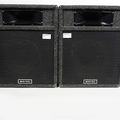
Sonic SM-12 - 2-way 12 inch speakers. ARTC owned and most often used if the house doesn't provide them. Passive speakers.
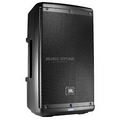
JBL EON - Active 2-way speaker. Take unamplified signal by XLR or quarter inch.


Amplifiers

Amps can also be built into the sound board on some occasions. Electro-Voice 7100. Takes XLR in and sends banana plug signal out.
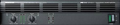
Mackie M-1400I. Has both XLR and quarter inch inputs and banana plug and quarter inch outputs. It's a big honkin' beast made for big honkin' rooms.


Mixers
Front of House mixers - the bosses
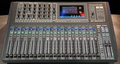
Soundcraft SI Impact. Fully digital mixer. Needs an amp, but does not need the rack mount extras. Outputs to a computer via USB
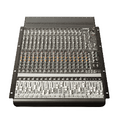
Mackie Onyx 1640. Requires the rack mount extras. All analog in, but has both analog and digital out. Needs an amp. Output to a computer via Firewire.
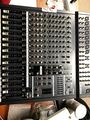
Yamaha EMX 5000. All analog mixer. Has a built-in amp, so unless you're doing a huge room you don't need one. Does not need the rack mount extras.


Submixers
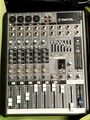
Mackie Pro FX8 - Normally used as a Foley submixer, but isn't often used at all anymore (2026). All analog XLR or quarter inch in or out. Normally runs to the main mixer so there is no amp. Does require its own power via Zip cord. Can provide phantom power to all mic channels.
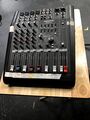
Mackie DFX 6. All analog XLR or quarter inch in or out. Connects to the main mixer so there is no amp. Does require its own power via Zip cord. Can provide optional phantom power to all mic channels. Typically used with the Show Cue Systems laptop using an external sound card which allows the SCS project to send multiple channels for easier mixing.

